Halloween Procreate Tracing Workbook
There’s a quiet shift happening in how creative professionals and hobbyists approach seasonal design—not with stock assets or rushed templates, but with intentional, skill-building tools that double as joyful rituals. The Halloween Procreate Tracing Workbook fits squarely into this movement: it’s not just a collection of spooky lettering pages—it’s a focused, tactile (yet digital) practice system built for today’s iPad-based creative workflow.
More Than Just Halloween-Themed Pages
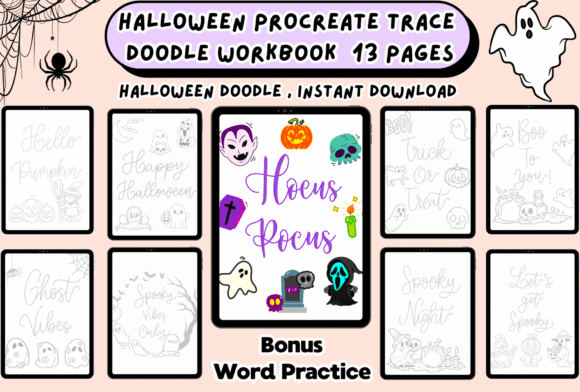
This isn’t clipart repackaged as “practice.” Each of the 13 printable and screen-optimized pages is structured to reinforce foundational hand lettering principles—stroke consistency, baseline alignment, letter spacing, and rhythm—through traceable guides designed specifically for Apple Pencil responsiveness. Words like “Boo,” “Witchy,” and “Trick or Treat” aren’t chosen for cuteness alone; they’re curated to introduce varying stroke weights, curve complexity, and ascender/descender balance. That means whether you’re sketching a social media story banner or refining your personal brand’s seasonal voice, you’re building transferable muscle memory—not just one-off decorations.
Why Digital Lettering Practice Is Gaining Ground
Over the past three years, digital lettering has moved beyond niche illustration circles into broader professional use—especially among educators designing classroom materials, small business owners crafting email headers, and content creators producing consistent visual identities across platforms. Unlike static fonts, hand-drawn lettering conveys authenticity and warmth—qualities audiences increasingly respond to amid algorithm-driven feeds. At the same time, users expect frictionless access: no software installs, no font licensing checks, no layer-messing in desktop apps. The Halloween Procreate Tracing Workbook meets that expectation by living entirely inside Procreate—a tool already familiar to over 10 million active iPad artists—and requiring zero setup beyond unzipping the PDF.
A Response to Changing Creative Habits
People aren’t spending more time on creative work—they’re spending it differently. Micro-practice sessions (10–20 minutes between meetings or after dinner) are replacing long studio blocks. That’s why the workbook’s format works: each page isolates one concept (e.g., connecting script letters, balancing thick/thin transitions), so progress feels immediate and measurable. You don’t need to “finish” a project to feel accomplished—you can trace “Pumpkin Spice” once, notice how your downstrokes improved from last week, and close the app satisfied. This aligns with research on habit formation: small, repeatable actions with clear feedback loops build consistency far better than ambitious, open-ended goals.
Designed for Real Devices, Real Hands
The workbook isn’t just “iPad-friendly”—it’s calibrated. The 8.5 × 11 inch size scales cleanly to iPad Pro and Air screens without distortion. Guides use high-contrast, low-opacity lines that remain legible under Apple Pencil tilt shading but don’t interfere with your own linework. Even the PDF structure respects modern workflows: pages load instantly, zoom smoothly, and print crisply if you prefer analog review or classroom sharing. No third-party plugins. No brush imports required—though optional Procreate brushes are included for those who want to experiment with texture or pressure sensitivity later.
Where Seasonal Meets Strategic
Halloween content used to be an afterthought—tacked on in October with generic graphics. Now, savvy creators treat it as part of their annual visual strategy. A well-crafted “Spooky Sale” announcement builds anticipation. A custom “Happy Haunting” invitation reinforces brand personality. An illustrated “Ghost Town” quote graphic invites saves and shares. The Halloween Procreate Tracing Workbook supports that shift by turning seasonal expression into deliberate practice—not just output. It’s the difference between grabbing a font off Google Fonts and developing a recognizable, ownable lettering style that evolves year after year.
Who Benefits—and How
Freelancers and designers use the workbook to warm up before client calls or generate quick, polished mockups for pitch decks. One branding designer told us she traces “Haunted Harvest” during her morning coffee, then reuses the composition (with minor tweaks) in three different client proposals that week—saving hours while keeping visuals cohesive.
Educators and workshop leaders appreciate the clean, scalable layouts. A middle school art teacher prints two copies per student: one for tracing, one for freehand reinterpretation. She reports higher engagement than with traditional worksheets—especially among students who associate “drawing” with performance anxiety. The trace-first approach lowers the barrier without sacrificing learning outcomes.
Small business owners find value in the dual-use nature: the same “Candy Corn Crew” phrase that becomes an Instagram sticker also inspires packaging copy or shop signage. Because the practice feels playful, it doesn’t compete with “real work”—it fuels it.
Not Just for Beginners
While the workbook welcomes newcomers—no prior Procreate knowledge needed—it also serves experienced users looking to refresh fundamentals. Lettering pros often fall into stylistic ruts, defaulting to familiar flourishes or avoiding certain letter combinations. Re-tracing “Wicked Witch” with deliberate attention to x-height and kerning can reveal subtle imbalances that carry over into client work. It’s akin to a musician practicing scales: simple in structure, profound in effect.
What’s Inside—And Why It Matters
- 13 thoughtfully sequenced pages, progressing from single-letter forms to connected phrases—designed to mirror natural skill development, not arbitrary difficulty jumps.
- Optimized PDF delivery: no DRM, no login walls, no expiring links—just a zip file you own, store locally, and revisit every October (or whenever inspiration strikes).
- Printable + digital-ready: trace on-screen with Apple Pencil, or print and use with pencil, fineliners, or watercolor—flexibility that respects diverse preferences and accessibility needs.
- No subscriptions, no upsells: what you download is complete. Updates (like bonus brush sets or alternate layouts) are occasional and free—not locked behind tiers or paywalls.
A Tool That Grows With You
Trends come and go, but the need for accessible, joyful skill-building remains constant. As AI-generated text and images flood feeds, human-made imperfections—the slight wobble in a “haunted” serif, the uneven thickness in a “candy corn” script—carry renewed weight. The Halloween Procreate Tracing Workbook doesn’t chase novelty. It supports presence: showing up with your hands, your device, and 15 minutes to reconnect with craft. That’s why users return year after year—not just for the themes, but because the structure helps them see growth across seasons. Your October 2023 “Ghoul Squad” trace looks different from your 2024 version. Not because the guide changed—but because you did.
Ready When You Are
You don’t need a big launch plan or a full day blocked off. Open the PDF in Procreate, select your favorite brush, tap play on a lo-fi playlist, and trace “Spooky Season Starts Now.” Let the rhythm settle in. Notice where your wrist relaxes. See how spacing tightens or loosens with repetition. That’s where real progress lives—not in perfection, but in returning, again and again, to the act of making something with care.