Daily Planner 2026: Your Real-World Anchor in a Constantly Shifting Day
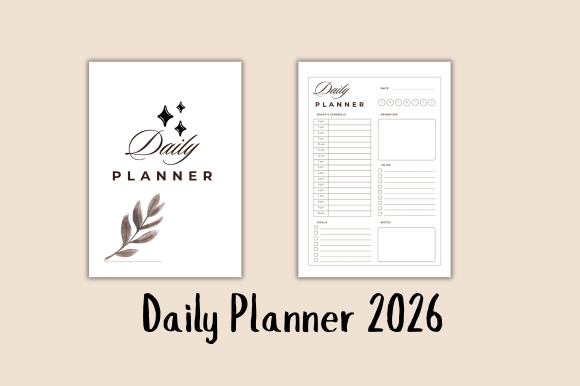
Let’s be honest: “just one more email,” “I’ll start that project tomorrow,” and “I’ll figure out my schedule later” rarely lead to calm, focused days. What actually works isn’t another app notification or a complex system—it’s a quiet, intentional space where your priorities, time, and energy meet on paper (or screen). That’s where the Daily Planner 2026 steps in—not as a rigid calendar, but as a flexible, undated daily companion built for how real people live and work right now.
It Starts With Flexibility—Not January 1st
You don’t need to wait for a new year—or even a new month—to reset your rhythm. The undated daily pages mean you can open the planner on March 17 after a chaotic week, or July 4 after returning from vacation, or even mid-semester during finals crunch—and begin with zero friction. No wasted pages. No guilt over skipped days. Just clean, consistent structure, ready when you are. For freelancers juggling overlapping client deadlines, educators planning units outside the academic calendar, or parents coordinating school pickups and therapy appointments, this flexibility isn’t a bonus—it’s essential.
When Time Feels Like Sand—Use the Hourly Schedule (6 AM–9 PM)
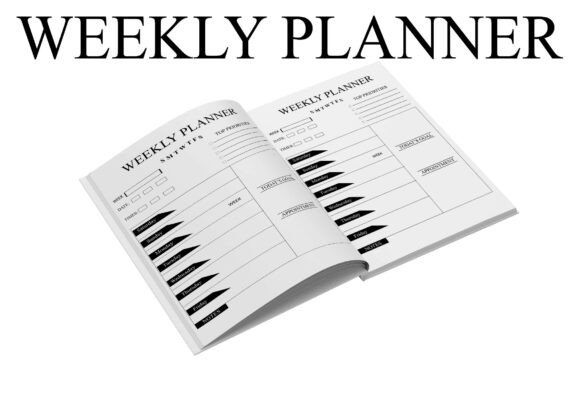
Ever look at your to-do list at 3 p.m. and realize you’ve spent two hours reacting instead of doing? The hourly schedule in the Daily Planner 2026 gives your day shape—not rigidity. It’s not about scheduling every minute like a CEO’s assistant; it’s about asking: What actually needs to happen between 9 and 11? Is that deep work time—or is that when I handle admin, calls, or creative warm-ups? A small business owner might block 8–10 a.m. for client proposals, leave 1–2 p.m. open for unexpected vendor messages, and protect 4–5 p.m. for learning or strategy. A student uses those same slots to alternate study sessions with active recall breaks—and actually sees the difference in retention.
Your To-Do List Finally Makes Sense
Most to-do lists fail because they’re dumping grounds—not decision tools. The to-do list section in the Daily Planner 2026 forces clarity: three to five items max, each tied to a specific outcome—not just “emails.” You’re not writing “respond to team”—you’re writing “approve Q3 budget draft & reply with feedback.” That small shift changes everything. A marketer launching a campaign uses it to track daily launch prep steps. A blogger building a content library uses it to batch outline → draft → edit → publish across multiple posts—without losing momentum. It’s not about doing more. It’s about knowing *what* matters *today*, so you stop choosing between urgency and importance.
Goals Don’t Live in January—They Live in Daily Action
“Lose weight,” “launch podcast,” “write book”—these stay dreams without connection to today’s reality. The goal tracker notes bridge that gap. Not as a progress chart, but as a brief, reflective space: What moved the needle today? What blocked me? What’s one tiny next step tomorrow? An entrepreneur tracking a product launch logs customer interview insights here—not just “call 3 people.” A teacher building classroom routines writes down what worked during morning circle—and what needs adjusting before tomorrow. This isn’t accountability theater. It’s quiet, consistent calibration.
Minimal Design Means Maximum Focus—On Paper or Pixel
No distracting icons. No forced color-coding systems. No pressure to “make it pretty.” The minimal printable design works because it gets out of your way. Print it at home on standard letter paper, clip it into a notebook, or load it as a PDF into your tablet with a stylus. A remote software developer uses it alongside Jira—not to replace tools, but to filter noise and plan actual coding blocks. A hobbyist restoring vintage cameras sketches parts inventory and repair timelines right beside their hourly grid. It adapts to your workflow—not the other way around.
Real Use Cases—Beyond the Buzzwords
- For creators launching a course: Block teaching prep (9–11 a.m.), record videos (2–4 p.m.), and batch community replies (7–8 p.m.)—then use goal notes to reflect on engagement metrics and tweak messaging daily.
- For caregivers managing multiple schedules: Use the hourly grid to align medication times, school drop-offs, telehealth appointments, and personal rest windows—so nothing slips, and self-care isn’t an afterthought.
- For students balancing part-time work and labs: Map shifts and class times first, then slot in study blocks *around* energy peaks—not just free hours—while using the to-do list to break research papers into daily 25-minute actions.
- For solopreneurs handling taxes, outreach, and delivery: Assign each role its own time window (e.g., “Admin Hours” 8–9 a.m., “Client Hours” 10 a.m.–12 p.m.), then track which tasks consistently run over—and why.
Before You Start—A Few Ground Truths
This isn’t magic. It won’t fix burnout overnight or erase unrealistic workloads. But it *will* reveal patterns you might miss otherwise—like how often “urgent” interrupts “important,” or how many decisions you make unconsciously because there’s no clear container for them. Try it for five days—not as a test, but as an experiment. Skip a page if you miss a day. Rewrite a to-do list mid-afternoon if priorities shift. The power isn’t in perfection—it’s in showing up, consistently, with intention.
If your current system leaves you tired but unaccomplished, overwhelmed by choice, or constantly playing catch-up, the Daily Planner 2026 offers something rare: simplicity with substance. It doesn’t ask you to become more disciplined. It asks you to become more present—to your time, your goals, and your own capacity. And sometimes, that’s the only productivity upgrade you actually need.