2026 Sunday Start Ultimate Planner: A Customizable, Print-Ready Tool for Intentional Planning
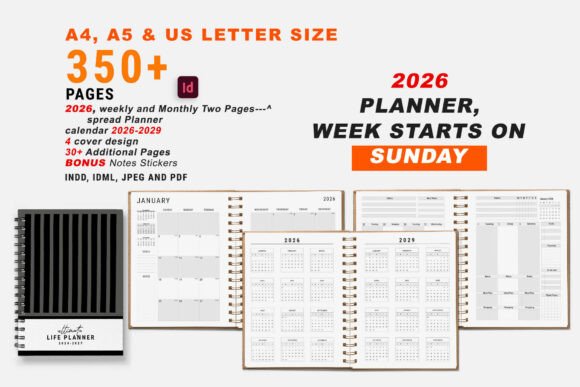
The 2026 Sunday Start Ultimate Planner is a comprehensive, editable InDesign-based planning system designed for people who value flexibility, visual control, and print quality—without sacrificing structure. Unlike pre-filled digital apps or static PDF planners, this bundle delivers fully layered, production-ready templates that users can adapt down to the font, color swatch, layout, and page size. It’s built around a Sunday-start weekly rhythm, supporting long-term goal setting while accommodating day-to-day tracking needs—from medication and mood to food logs and project timelines.
What Sets This Planner Apart
Most printable planners fall into one of two categories: rigid (fixed layouts, limited personalization) or overly generic (blank pages with minimal guidance). The 2026 Sunday Start Ultimate Planner occupies a deliberate middle ground. Its strength lies in its intentional scaffolding: each section—from the 30-Day Challenge tracker to the Goal Action Plan—is purpose-built, yet none are locked in place. Because it’s delivered as both INDD and IDML files, users can modify paragraph styles, adjust grid spacing, reposition headers, or swap out icons without breaking formatting.
This level of control matters most when consistency and clarity support real behavior change. For example, someone managing chronic health conditions may need to adjust the weight tracker’s scale labels or add a custom column to the medication log—something easily done in InDesign but impossible in flattened PDFs or app-based tools with fixed fields. Similarly, educators or freelancers might repurpose the “My Project” spread into a client milestone dashboard, changing colors and headings to match their brand—all within minutes.
Format Flexibility Meets Print Readiness
The bundle includes A4, A5, and US Letter versions, all set in CMYK with bleed and crop marks. That means it’s ready for professional printing—or home use with reliable color fidelity. Many digital-first planners prioritize screen readability over print performance: thin fonts, low-contrast grays, or RGB-only palettes that shift unpredictably on paper. Here, the inclusion of pre-defined color swatches and paragraph/character styles ensures that edits stay legible and cohesive, whether you’re lightening a background for ink savings or switching to high-contrast mode for accessibility.
It’s also notable that the download includes both editable source files and a ready-to-print PDF—plus a separate instructions PDF. That dual-path approach supports different user comfort levels: experienced InDesign users can dive straight into customization, while newcomers can follow step-by-step guidance before experimenting. The included free font link further removes friction, eliminating licensing concerns during early-stage testing.
How It Compares With Other Planning Approaches
Compared to digital tools like Notion or Google Keep, the 2026 Sunday Start Ultimate Planner trades real-time syncing and searchability for tactile engagement and visual continuity. Research suggests handwriting improves retention and focus—especially for complex tasks like goal mapping or habit reflection. But unlike analog-only options (e.g., undated bullet journals), this planner offers structured frameworks that reduce decision fatigue at the start of each week or month.
Against other editable printable planners, the distinction is largely technical and practical. Some competitors offer PowerPoint or Canva versions—but those often lack style consistency across pages, limit typography control, or break alignment when resizing elements. InDesign’s precision-based workflow avoids those pitfalls. Likewise, while many PDF planners claim “customization,” they usually mean only text fields—not full typographic, spatial, or color-system control.
There’s also a material difference in scope. Where some bundles include only weekly and monthly spreads, this one embeds functional trackers (calories, mood, assignments) and reflective tools (journal prompts, “All About Me”) without overcrowding. Each page serves a documented planning need—not just aesthetic variety.
When This Planner Fits Best—and When It Might Not
This resource works well for users who:
- Prefer physical planning but want more than blank lines or rigid templates;
- Have access to Adobe InDesign (CC 2020 or newer) or are willing to learn its fundamentals;
- Need consistent branding or visual identity across planning materials (e.g., coaches creating client workbooks);
- Value long-term usability—since the same INDD file can be reused across years by updating dates and content;
- Require print-quality output for sharing, gifting, or professional presentation.
It’s less suited for users who:
- Don’t have InDesign or aren’t comfortable installing and learning a desktop publishing tool;
- Prefer cloud-based access, automatic reminders, or data aggregation (e.g., trend graphs from mood entries);
- Only need short-term or single-purpose tracking (e.g., a 7-day meal plan) and don’t benefit from full-year scaffolding;
- Want immediate plug-and-play use without any setup—even minor adjustments require opening the file in InDesign first.
For those in the second group, a well-designed PDF-only planner—or even a hybrid approach (using this as a base, then exporting key spreads to PDF for daily use)—may bridge the gap.
Practical Use Cases Across Roles
A small business owner might use the “Work Schedule” and “My Project” spreads to map Q1 deliverables, then customize the cover design with company colors and logo placement. A student could combine the Assignment Tracker with the Daily Planner to align deadlines and study blocks—while using the Habit Tracker to reinforce consistent review routines before exams.
Someone rebuilding routines after burnout may find value in the Sunday-start orientation: it creates natural reset points without demanding perfection mid-week. The Mood Tracker and Journal pages encourage reflection without prescriptive prompts, letting users define what insight matters most to them—whether it’s energy patterns, social interactions, or sleep quality correlations.
Realistic Expectations Around Customization
While the 2026 Sunday Start Ultimate Planner promises full editability, it’s worth noting that customization depth scales with familiarity. Swapping fonts or adjusting swatches takes seconds. Redesigning a two-page weekly spread to accommodate three time zones or adding conditional formatting requires deeper InDesign knowledge. The instructions PDF covers core workflows, but advanced features like master page overrides or data merge aren’t included—nor are they necessary for most users.
That balance—powerful enough for iterative refinement, simple enough for steady use—is where this planner distinguishes itself. It doesn’t assume expertise, but it doesn’t cap potential either. And because it’s delivered as both INDD and IDML, users on older InDesign versions won’t hit compatibility walls—a common pain point with template marketplaces.
Making an Informed Choice
Choosing a planner isn’t just about aesthetics or features—it’s about matching your workflow, constraints, and goals. If you rely on digital notifications, cross-device access, or automated analytics, this isn’t the primary tool for you. But if you find yourself returning to pen-and-paper for clarity, and want that experience supported by thoughtful, adaptable structure, the 2026 Sunday Start Ultimate Planner offers rare cohesion between intention and execution.
Its Sunday-start framework supports forward-looking habits without erasing the value of rest or reflection. Its editable nature respects your autonomy—not just to fill in blanks, but to shape the system itself. And its print-ready foundation ensures what you plan remains tangible, durable, and consistently legible—no battery required.